
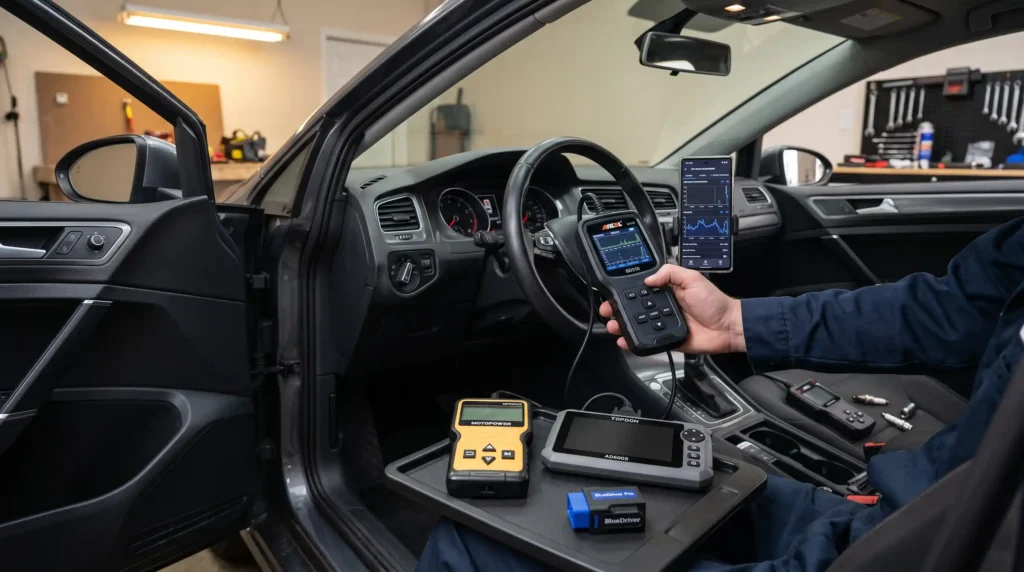
If you want one scanner that works well for most DIY jobs, the Ancel BD310 is the best overall choice. It gives you a useful combination of a handheld scanner, Bluetooth connectivity, live data, and basic diagnostic functions without jumping into professional-tool prices.
But it’s not automatically the right scanner for everyone.
If you want a phone-based diagnostic experience with enhanced diagnostics, the BlueDriver Pro Next Gen is a better fit. If all you need is an inexpensive way to read a check engine code, the MOTOPOWER MP69033 does the job. And if you’re a serious DIYer who wants access to ABS, SRS, transmission systems, and service functions, the TOPDON AD600S is the more capable option.
That’s really the trick with OBD2 scanners.
Don’t buy the scanner with the longest feature list. Buy the one that can diagnose the systems you actually need to work on.
Table of Contents
The Best OBD2 Scanners of 2026
Best Overall: Ancel BD310

Typical price: around $79
The Ancel BD310 is my pick for the best overall OBD2 scanner because it strikes a very useful balance.
You can use it as a traditional handheld scanner or connect it through Bluetooth and use the companion app for additional information and monitoring.
That flexibility is the main attraction.
Car and Driver also currently names the BD310 its Best Overall OBD-II scanner after hands-on testing, highlighting its combination of corded and Bluetooth operation, user-friendly app, and quick code retrieval.
ANCEL’s own specifications list support for major OBD-II protocols, including J1850 PWM, J1850 VPW, ISO9141, KWP2000, and CAN, along with lifetime software updates.
What I like
- Two ways to use it: handheld or Bluetooth.
- Good app interface for viewing additional information.
- Live-data capability for supported parameters.
- Battery testing and performance features.
- Lifetime updates.
- Reasonable price for a DIY scanner.
The independent testing also found 18 active live-data PIDs, 13 freeze-frame PIDs, and six I/M monitors during its test.
The catch
The BD310 is not a full multi-system professional scan tool.
If your main goal is diagnosing ABS, SRS or other manufacturer-specific modules, you’ll want to look at a scanner specifically designed for broader system coverage.
It also doesn’t provide bidirectional control.
Who it’s for
The DIYer who wants one useful scanner for everyday engine diagnostics, live data, and basic troubleshooting without spending several hundred dollars.
Best overall: Ancel BD310.
Best Bluetooth OBD2 Scanner: BlueDriver Pro Next Gen

Typical price: around $95
If you prefer using your phone rather than carrying around another screen, the BlueDriver Pro Next Gen is one of the strongest Bluetooth choices available right now.
And the reason isn’t simply that it connects to your phone.
The app is the real selling point.
BlueDriver can read and clear supported codes, display live data, show freeze-frame information, check emissions readiness, and provide Repair Reports that connect vehicle-specific trouble codes with possible causes and verified repairs. BlueDriver says the Pro Next Gen has no subscription fees or add-ons.
What I like
- Excellent smartphone app.
- Enhanced diagnostics on supported vehicles.
- ABS, airbag/SRS and other system access where supported.
- Live data and freeze-frame information.
- Repair Reports.
- Mode 6 diagnostic information.
- No recurring subscription.
Car and Driver currently ranks it as its Best Bluetooth Scanner, particularly praising the app and diagnostic guidance.
The catch
There’s an important word here:
Supported.
BlueDriver’s enhanced diagnostics aren’t identical across every vehicle.
The company itself provides a vehicle compatibility checker because diagnostic coverage depends on the vehicle’s year, make, model, and original sales region.
So don’t assume that buying the scanner automatically gives you ABS, SRS, or every other module on every vehicle.
Check your exact vehicle first.
There’s also an initial account setup, which adds a little time before you can start scanning.
Who it’s for
The DIYer who likes smartphone diagnostics and wants more information than a basic code reader provides.
It’s particularly appealing if you work on several compatible vehicles and want diagnostic reports and live data without buying a large scan tablet.
Best Bluetooth scanner: BlueDriver Pro Next Gen.
Best Budget OBD2 Scanner: MOTOPOWER MP69033

Typical price: around $15–$27
Sometimes you don’t need a fancy diagnostic tablet.
You just want to know why the check-engine light came on.
That’s where the MOTOPOWER MP69033 makes sense.
It’s a straightforward, wired OBD2 code reader designed for basic engine diagnostics. MOTOPOWER lists functions including reading and clearing trouble codes, live data, freeze-frame information, I/M readiness, and vehicle information. It supports nine OBD2 protocols.
Car and Driver also found it to be the fastest of the hardwired scanners in its test, retrieving the test code in about 17 seconds.
What I like
- Low price.
- No app or Bluetooth pairing.
- Simple plug-and-play operation.
- Reads and clears supported codes.
- Live data.
- Freeze-frame information.
- I/M readiness checks.
- Built-in code definitions.
The catch
It’s basic.
That’s not necessarily a bad thing.
But if you want to diagnose ABS, SRS or other modules, this isn’t the scanner I’d choose.
Think of it as a good basic engine code reader, rather than a complete vehicle diagnostic tool.
Who it’s for
The occasional DIYer who wants to know what a check engine light means before deciding what to do next.
It’s also a sensible backup scanner to keep in the garage or toolbox.
Best budget scanner: MOTOPOWER MP69033.
Best Value: TOPDON AD600S

Typical price: around $180–$250, depending on retailer and current promotions
The TOPDON AD600S is where things start getting more interesting.
This isn’t just a basic code reader.
It’s a multi-system diagnostic tool aimed at DIYers who want access to systems such as the engine, transmission, ABS, and SRS, along with service functions.
TOPDON currently lists nine service functions and CAN-FD support, with coverage depending on the vehicle.
Car and Driver currently names the AD600S its Best Value scanner, and found it offered bidirectional capability at a much lower price than its more expensive professional alternatives.
What I like
- Engine, ABS, SRS, and transmission diagnostics.
- Nine service/reset functions.
- CAN-FD support.
- 5-inch touchscreen.
- Free updates for this model.
- Useful choice for working on multiple vehicles.
- Much more capable than a basic code reader.
The available service functions can include things such as oil reset, EPB, SAS, TPMS, battery-related service, and ABS bleeding, depending on the vehicle.
The catch
Here’s where you need to read the specifications carefully.
Service functions vary by make, model and year.
And although Car and Driver describes the AD600S as a bidirectional scanner, TOPDON’s current product information distinguishes it from its more advanced tools and specifically lists no bidirectional actuator commands.
So I would not buy the AD600S expecting the same active-test capability as a higher-end professional diagnostic platform.
Who it’s for
The dedicated DIYer who works on multiple vehicles and wants more than engine-code reading.
If you’re regularly dealing with ABS faults, SRS codes, transmission diagnostics, or service resets, this is where spending more than $30–$60 starts to make sense.
Best value: TOPDON AD600S.
How to Choose the Right OBD2 Scanner
Here’s what actually matters.
1. What systems do you need to diagnose?
Start here.
Engine codes only:
A basic scanner such as the MOTOPOWER MP69033 may be all you need.
Engine + more advanced smartphone diagnostics:
The BlueDriver Pro Next Gen is worth considering.
Engine + ABS + SRS + transmission + service functions:
Look at something like the TOPDON AD600S while checking coverage for your exact vehicle.
Don’t buy a scanner based only on the number of features printed on the box.
Check whether those features work on your car.
2. Wired vs. Bluetooth
This one is mostly personal preference.
Wired
A wired scanner is simple.
Plug it in, turn the ignition on, and start scanning.
No phone. No Bluetooth pairing. No app.
For something you only use occasionally, that’s hard to beat.
Bluetooth
Bluetooth gives you the advantage of a larger phone display and a more software-driven interface.
It can also make live data easier to view and record.
The downside?
You’re depending on your phone, the app, and the Bluetooth connection.
Neither approach is automatically better.
3. Do you need a subscription?
This is worth checking before you buy.
A scanner can look inexpensive at first and become much more expensive if important functions or updates require recurring payments.
The four scanners covered here don’t require a recurring subscription for their core advertised functions, although update policies and included features differ by product. BlueDriver and TOPDON specifically advertise no subscription fees for these models.
4. What’s your skill level?
You don’t need to be a professional mechanic to use a scanner.
Beginner
MOTOPOWER MP69033
Good for basic code reading and simple information.
Intermediate DIYer
Ancel BD310 or BlueDriver Pro Next Gen
Better choices if you want live data and more diagnostic information.
Advanced DIYer
TOPDON AD600S
Makes more sense if you’re regularly working with multiple vehicle systems and service functions.
5. Do you need service resets?
This is easy to overlook.
If you do your own maintenance, service functions can save you a trip to the shop.
Depending on the vehicle, that might include things such as:
- Oil reset.
- EPB service.
- Steering-angle calibration.
- TPMS-related functions.
- Battery service.
- ABS bleeding.
- Throttle adaptation.
But remember:
A scanner’s advertised service functions aren’t necessarily available on every vehicle.
Always check compatibility first.
What an OBD2 Scanner Can and Can’t Tell You
This is probably the most important thing to understand before buying one.
An OBD2 scanner can give you valuable diagnostic information.
But it doesn’t magically tell you which part to replace.
A scanner can help you:
- Read diagnostic trouble codes.
- Clear many supported codes.
- View live data.
- View freeze-frame information.
- Check emissions readiness.
- Monitor supported sensors and parameters.
- Access additional modules on compatible diagnostic tools.
- Perform certain service functions on supported vehicles.
A scanner cannot automatically:
- Prove which component failed.
- Replace a wiring test.
- Confirm a bad ground.
- Diagnose every mechanical problem.
- Replace a multimeter or other diagnostic equipment.
- Guarantee that a vehicle is safe to drive.
Here’s a simple example.
Suppose you get a P0301 misfire code.
That tells you the ECU detected a misfire on cylinder 1.
It does not tell you to automatically replace the spark plug.
You still need to determine whether the cause is ignition, fuel, air, compression, wiring or something else.
That’s why a good diagnostic process looks like this:
Code → symptoms → live data → testing → diagnosis → repair → verification
Not:
Code → buy part.
That little distinction can save you far more money than the scanner itself.
Are Cheap OBD2 Scanners Worth It?
Absolutely, if you know what you’re buying.
A basic scanner can be perfectly useful for reading a check engine code.
What it won’t necessarily do is communicate with every control module in a modern vehicle.
Think about it like a multimeter.
A basic multimeter can tell you voltage.
That doesn’t make it equivalent to an oscilloscope.
The same principle applies to scan tools.
A $30 code reader can be extremely useful.
It just shouldn’t be mistaken for a professional diagnostic platform.
Can an OBD2 Scanner Clear a Check-Engine Light?
Most scanners can clear many supported diagnostic trouble codes.
But clearing a code doesn’t repair the underlying problem.
If the fault is still present, the warning light may come back.
There is another important detail: some permanent diagnostic trouble codes cannot simply be erased with a scan tool. The vehicle has to determine that the underlying problem has been repaired before the permanent code disappears.
So the better process is:
Read the code → diagnose the cause → repair the problem → clear the code if appropriate → verify the repair.
Don’t use the clear button as a substitute for diagnosis.
FAQs
Will leaving my OBD2 scanner plugged in drain my car battery?
Yep, it can. The port stays live even with the key off. A few hours won’t hurt, but days? You might need a jump. Just unplug it when you’re done.
Q: Can an OBD2 scanner clear a check engine light permanently?
Nope. Clearing the code just turns off the light. If the problem’s still there, the light comes back. Fix the issue first, then clear it to confirm.
Q: Will any OBD2 scanner work on my car?
Not all of them. Most work on 1996+ U.S. gas cars for basic codes. For ABS, airbags, or European/Asian models, check compatibility before buying; every scanner is different.
Q: What’s the difference between a cheap OBD2 scanner and an expensive one?
Coverage. Cheap ones read engine codes only. Expensive ones read ABS, airbags, transmissions, and can even run tests. Buy for what you actually fix, not the price tag.
The Bottom Line
Here’s how I’d look at these four:
- Get the Ancel BD310 if you want the best balance of price, features, and simplicity. It’s the one I’d recommend to most DIY car owners.
- Get the BlueDriver Pro Next Gen if you prefer smartphone diagnostics and want enhanced diagnostic information on supported vehicles.
- Get the MOTOPOWER MP69033 if you mainly need an inexpensive, straightforward engine code reader.
- Get the TOPDON AD600S if you’re a more serious DIYer who needs multi-system diagnostics and service functions.
Most people should buy the Ancel BD310.
But if you already know that you need ABS diagnostics, SRS access, transmission diagnostics, or service resets, don’t buy the “best overall” scanner just because it won the category.
Buy the scanner that matches the job.
That’s the part many OBD2 scanner buying guides miss.
The goal isn’t to own the scanner with the longest feature list.
The goal is to get the right information so you can find the real problem.
And that little check engine light?
It doesn’t have to be scary anymore.
Prices and availability can change by retailer. Product features and diagnostic coverage can also vary by vehicle, model year, and market. Product recommendations above are based on current manufacturer specifications and current independent testing, including the 2026 Car and Driver OBD-II scanner test.